This project makes it possible to connect your (old) CDJ 1000 MK3 as a midi controller to Rekordbox. You will only have to connect 5 wires to your CDJ’s and the project is completely reversible if you want it to go back using CD’s.
While I consider this an easy project, things could go wrong and you can damage your electronics! So do this project at your own risk!
Note that basic functions of using Rekordbox with CDJ 1000 can ben achieved with using timecode CD’s.
UPDATE 09-FEBRUARY-2021:
Both the source and compiled HEX file are now up on Github
OLD DOWNLOAD (CSV & HEX) ->
CDJ2MIDI_V1.zip
UPDATE 01-SEPTEMBER-2020:
After going through my backups I’ve found an old source for this project. As I’m not planning to work on this in the near future feel free to download and use it. But be nice and be sure to mention Андрей Анацко and also me as project starters and link to this website. Cheers!
The zip file contains the complete source, you can open it with Keil uVision 5 (project file is in the MDK-ARM folder).
This project started when I found Андрей Анацко project to reverse engineering the SPI commands for the cdj1000 mk3. This project is found here. Be Sure to check out his CDJ new life project!
Initially I started this project using an Arduino to translate the CDJ SPI signal to MIDI commands. I got stuck and contacted Андрей Анацко to ask for his help. He was very kind to help me start this project. The project now uses a STM32F429I-DISCOVERY. Total cost are around €60-80 for all the needed hardware.
I worked on it for a few months and there are stil bugs in there so I do not consider this a finished project. As usual use this software at your own risk. I cannot be helt responsible for any damage to your equipment.
If you feel you have a contribution or found a bug just let me know in the comments (here or on youtube). My time for this project is limited so please be patient for a response.
Controls
The CDJ controls are mostly the same except for:
- Jogmode Select = Slip mode
- MP3 Folder Search = browse up and down
- Eject = Load selected track
- MP3 Folder Search + Time Mode / Auto CUE = Windows switch (buggy)
- Textmode short press = 4 Loop
- Textmode long press = 8 Loop
- Unlock – Lock = Switch deck. Deck 1 becomes 3 Deck 2 Becomes 4
- Release Start = not used
- Hot Cue Green = Set
- Hot Cue Orange = Empty
- Recmode = Delete Hot Cue
Logic Level Shifter
First step is to build yourself 2 logic level shifters. You will need these (one for each CDJ) because the CDJ works at 5 volts and the stm32 at 3.3 volts. I suggest you build 2 small pcb’s, one for each CDJ.
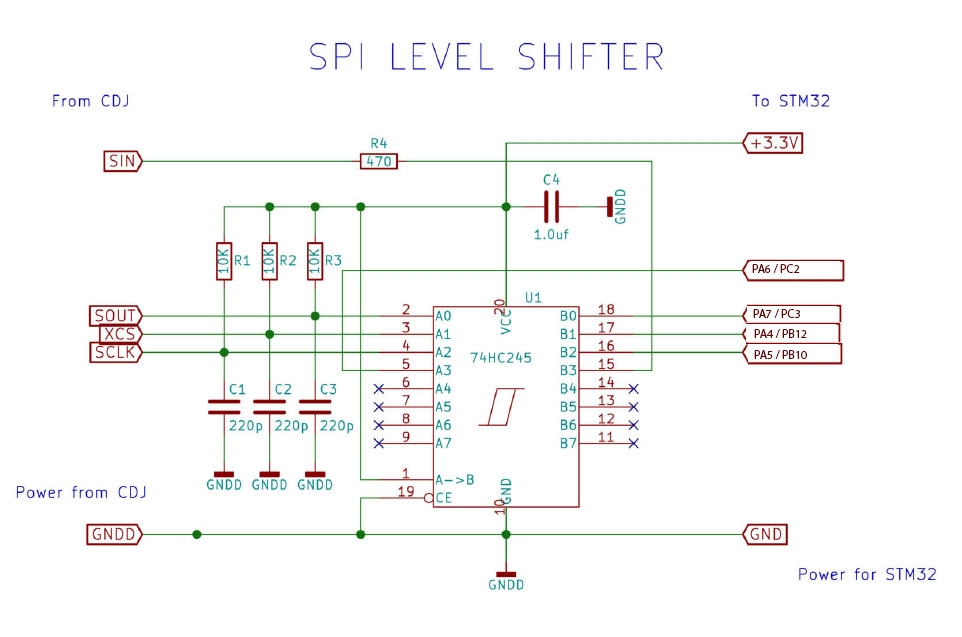
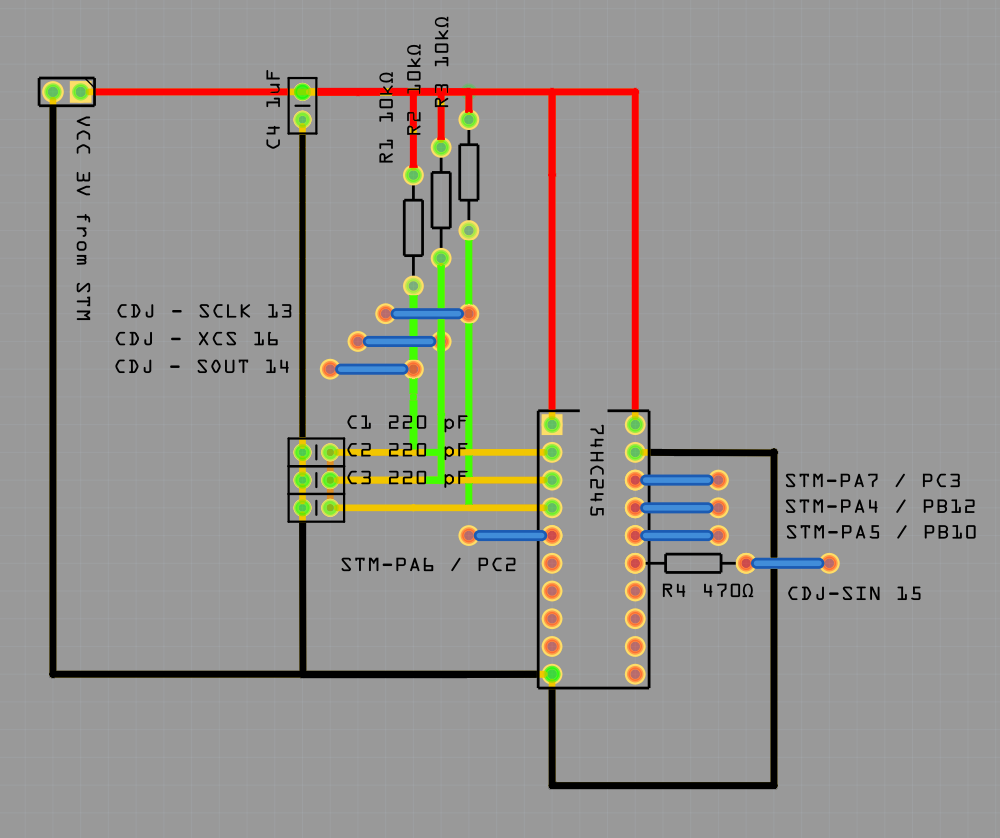
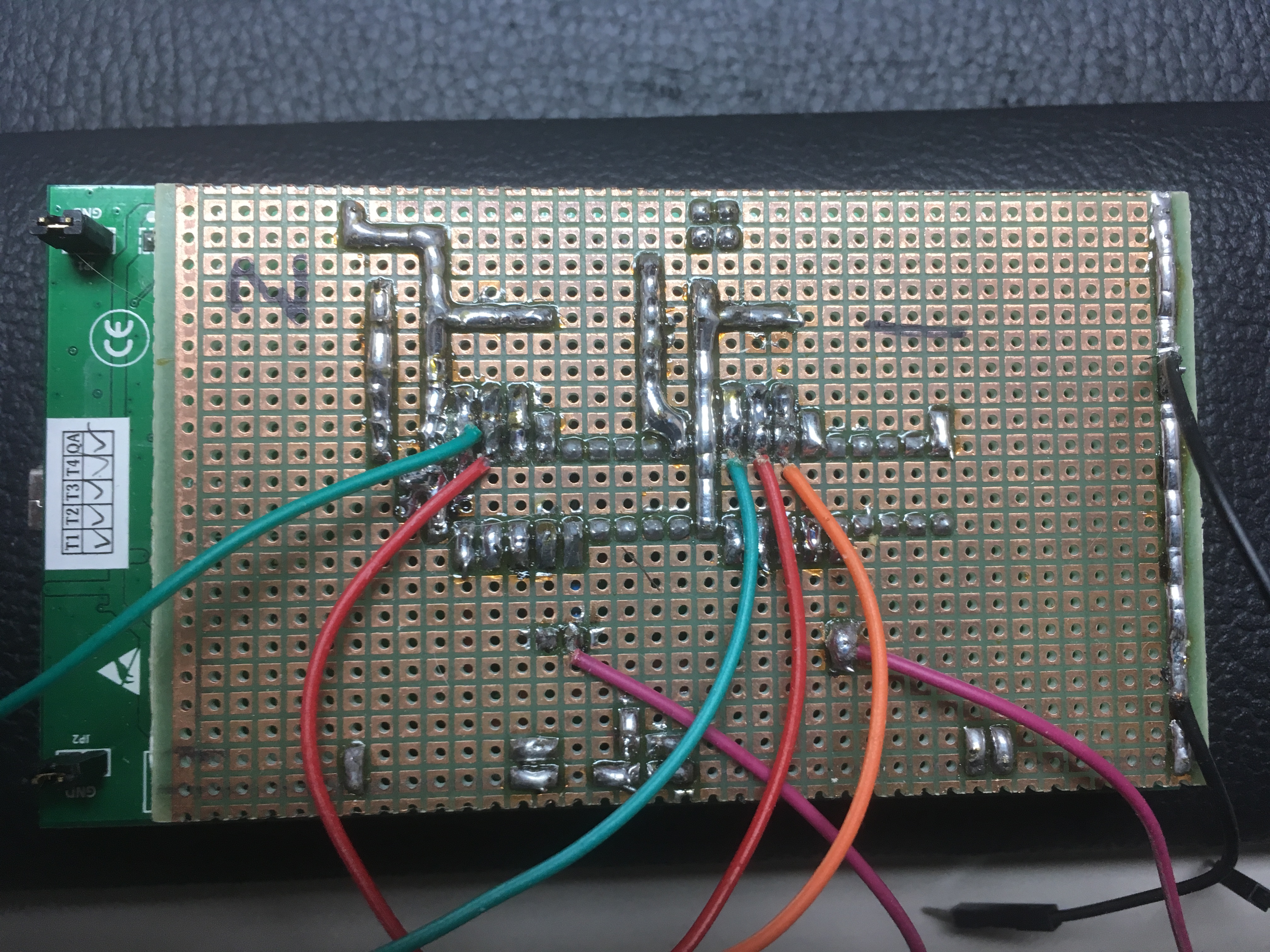
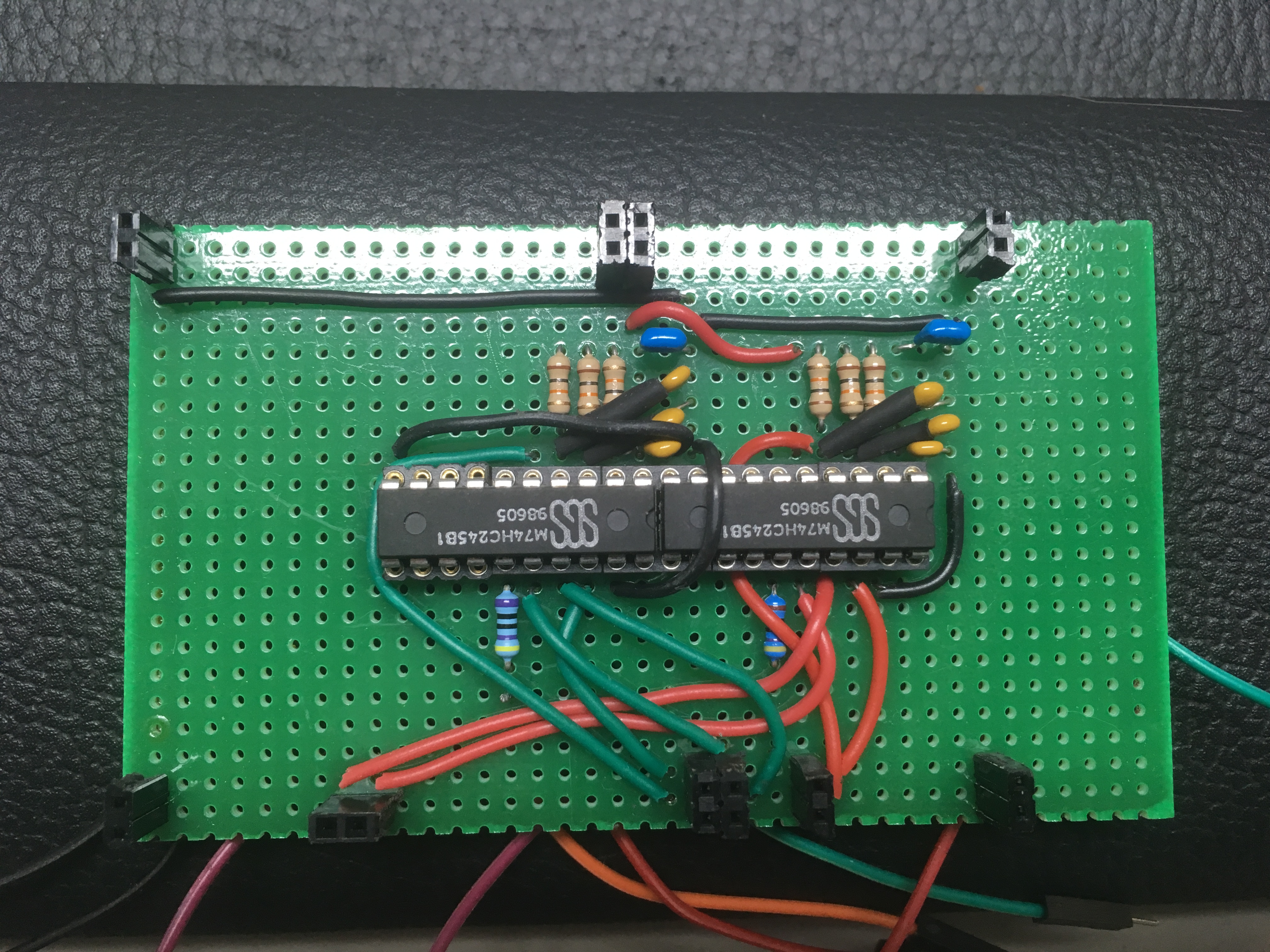
You will need;
2x 74HC245
6x ceramic 220pf
2x ceramic 1uF
6x 10 kOhm
2x 470 Ohm
You will also need;
STM32F429I-DISCOVERY and 2 CDJ 1000’s MK 3
ground should be shared between your logic level shifter to the CDJ and the STM32.
Connections to the top panel of the CDJ as in the photo’s below. 13. SCLK 14. SOUT 15. SIN 16. XCS and GND
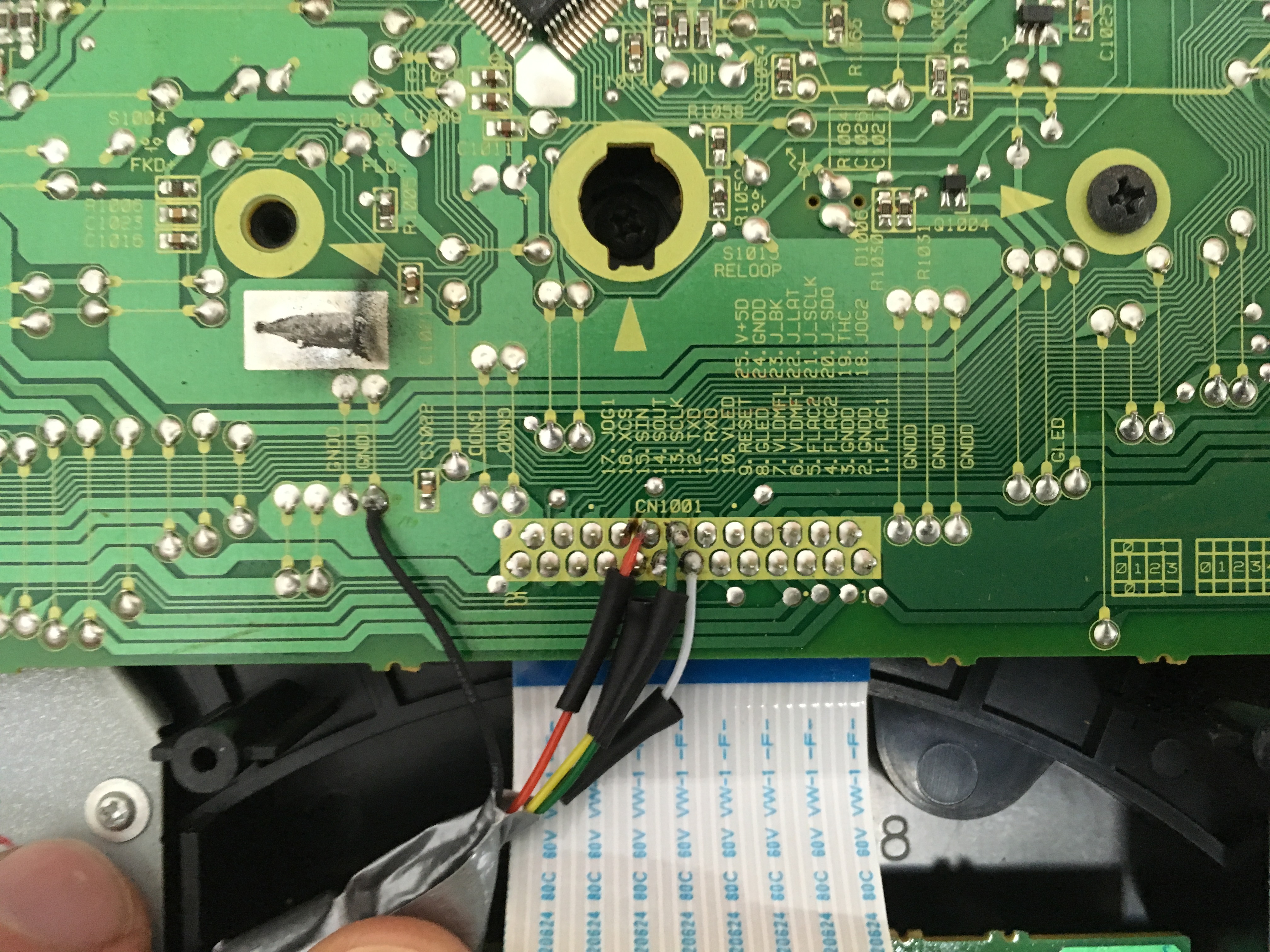
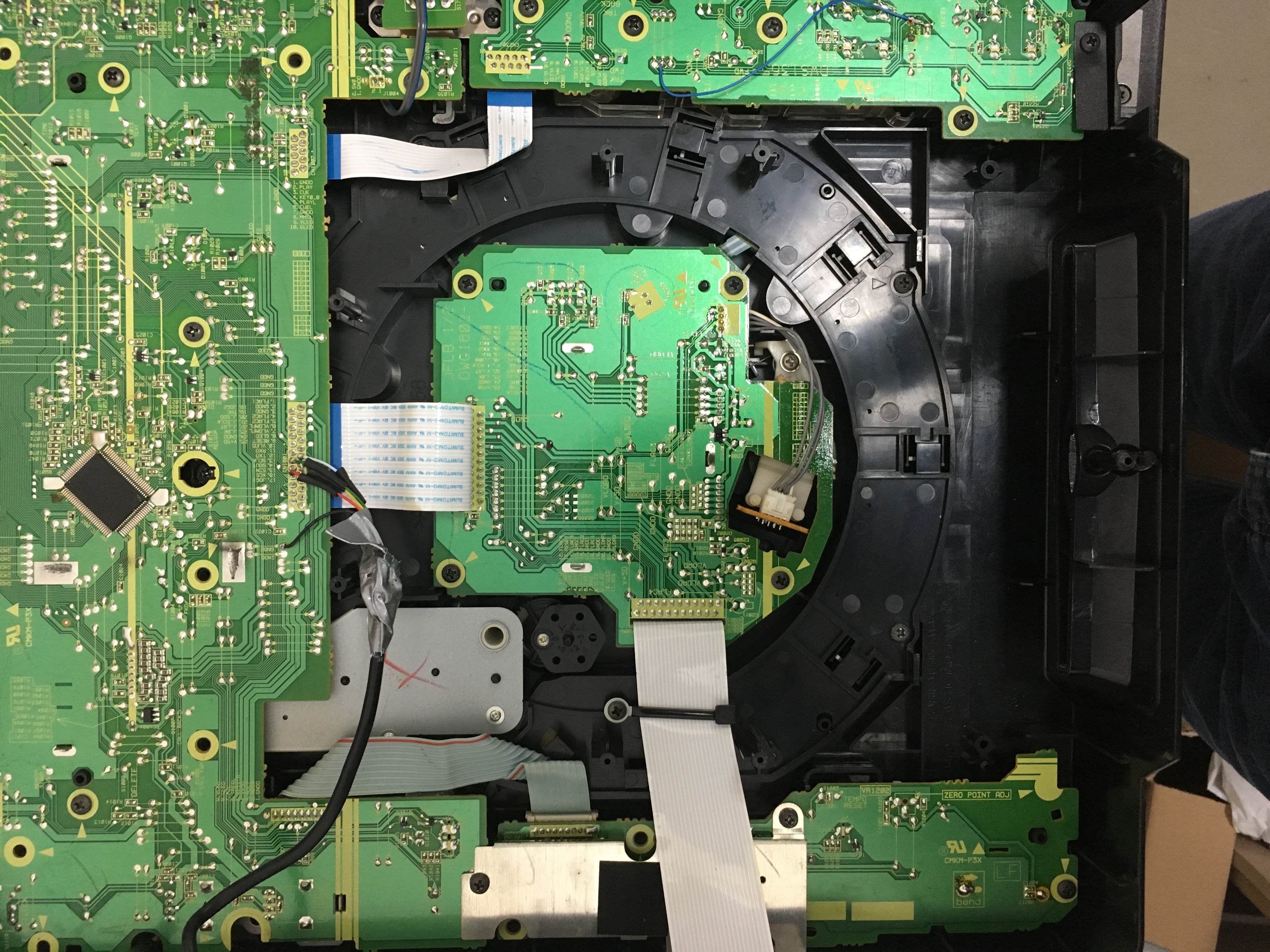
Connections to the stm32
CDJ 2/4: PC2 SPI 2 MISO – PC3 SPI 2 MOSI – PB10 SPI 2 SCK – PB12 SPI 2 NSS
CDJ 1/3: PA6 SPI1 MISO – PA7 SPI1 MOSI – PA5 SPI1 SCK – PA4 SPI1 NSS
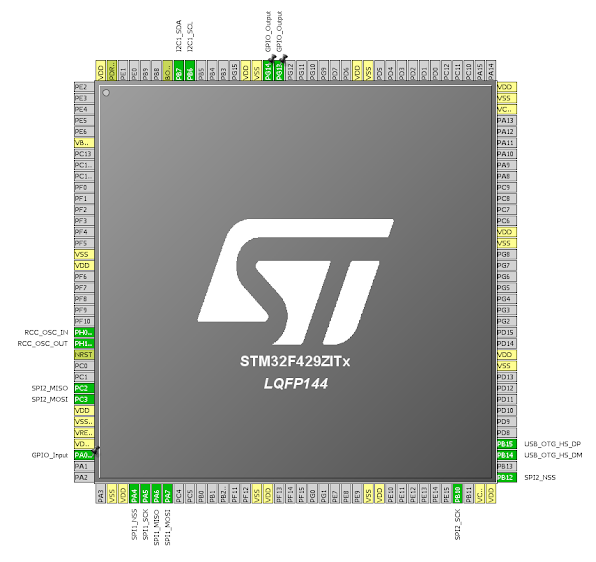
Don’t forget to disconnect the main pcb from your CDJ so it will not interfere with the stm32. You don’t have to disconnect all cables. Just the one in the photo.
The main pcb is located under the metal plate at the bottom of your CDJ.
Before disconnecting make sure your cd-drive is unloaded.
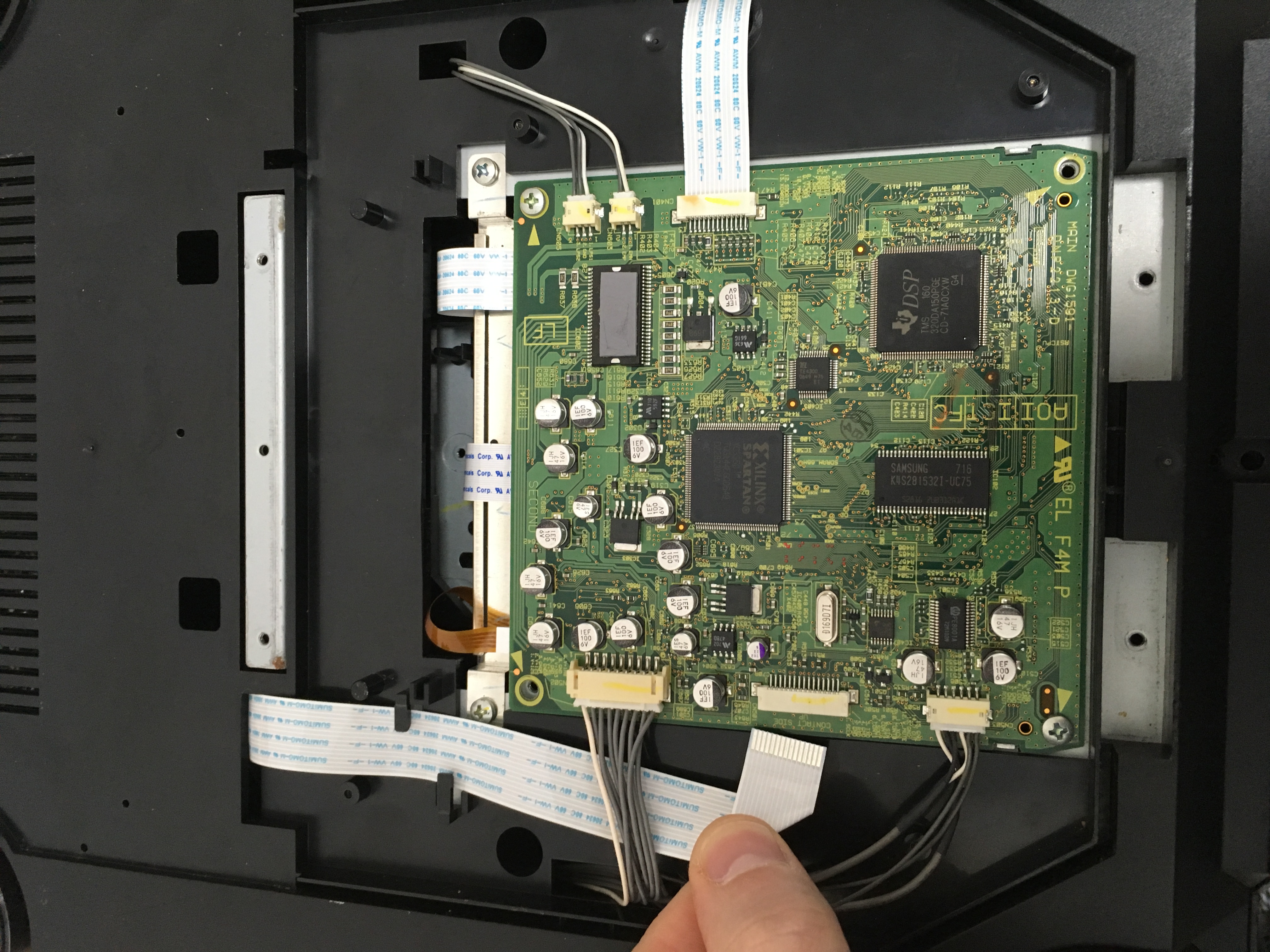
All hardware is connected now, let’s continue with the software side.
- Install Rekordbox (https://rekordbox.com/)
- Install stm32 cube programmer (https://www.st.com/en/development-tools/stm32cubeprog.html)
- Connect stm32 mini USB to your computer (windows will detect an USB drive)
- Run stm32 Cube programmer
- Use stm32 Cube programmer to download CDJ2MIDI_V1.HEX into your STM32 device
- Close program
- Disconnect mini usb
- Connect mini usb
- Open rekordbox
- When it is fully launched connect the stm32 micro USB to the computer.
- Rekordbox will regocnize PIONEER DDJ SX and ask you to install driver.
- After the installation is complete start your trial or use your license
- Configure your audio output (read sidenote at the end of this file)
- Go to MIDI in the upper right corner and select import
- Import the CDJ2MIDI_V1.CSV file
- Close rekordbox
- Disconnect mini usb and micro usb from your computer
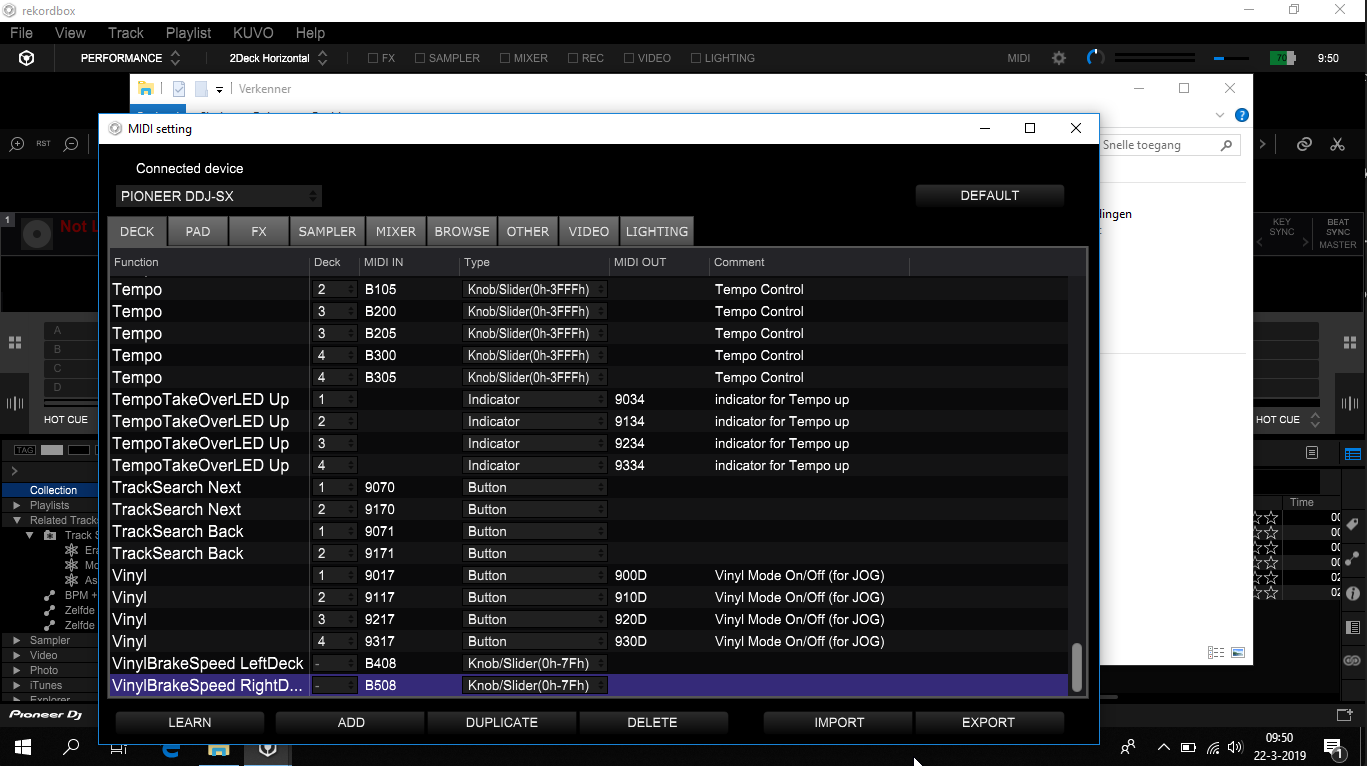
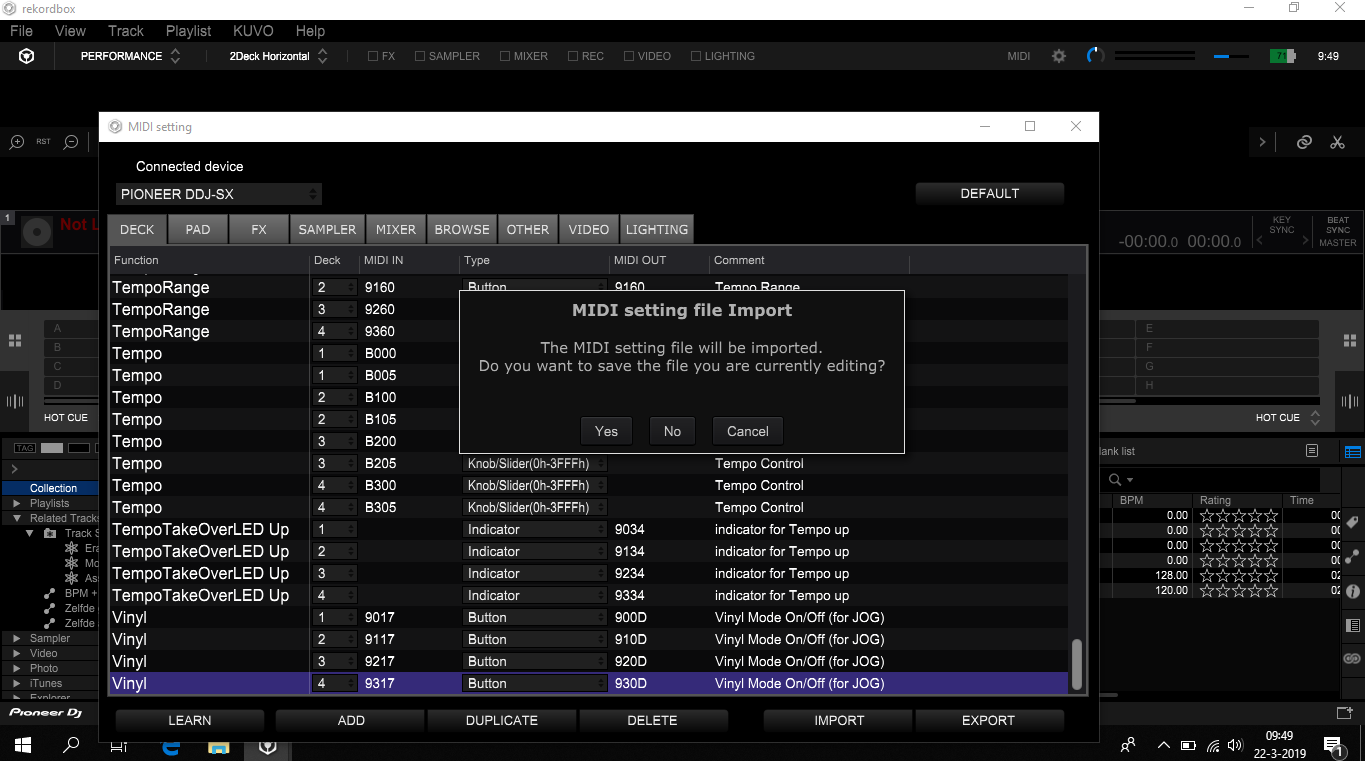
Connecting to Recordbox
All your software is now setup
- Connect your CDJ to STM32
- Power up you CDJ’s as usual
- You should see the POWER ON message on your CDJ display
- You now have to connect the mini usb from the stm32 to an USB charger, it is only needed for power.
If you did this correctly (you’ll have about 10 to 20 seconds) your CDJ should be powered and LED’s will light up. If not you’ll get an error code E-8709. Disconnect the stm32 from the computer power down your CDJ’s and try again from step 1.
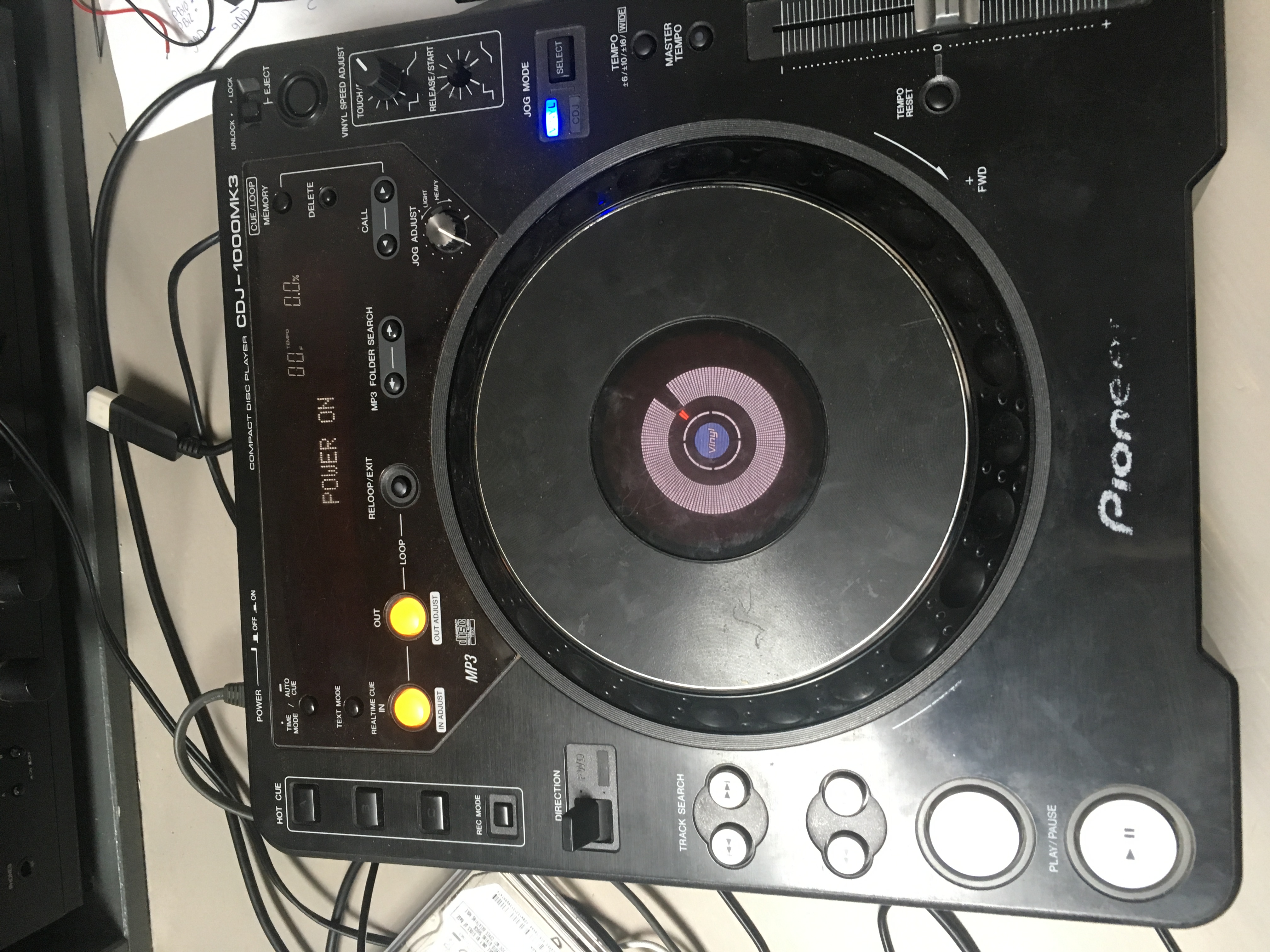
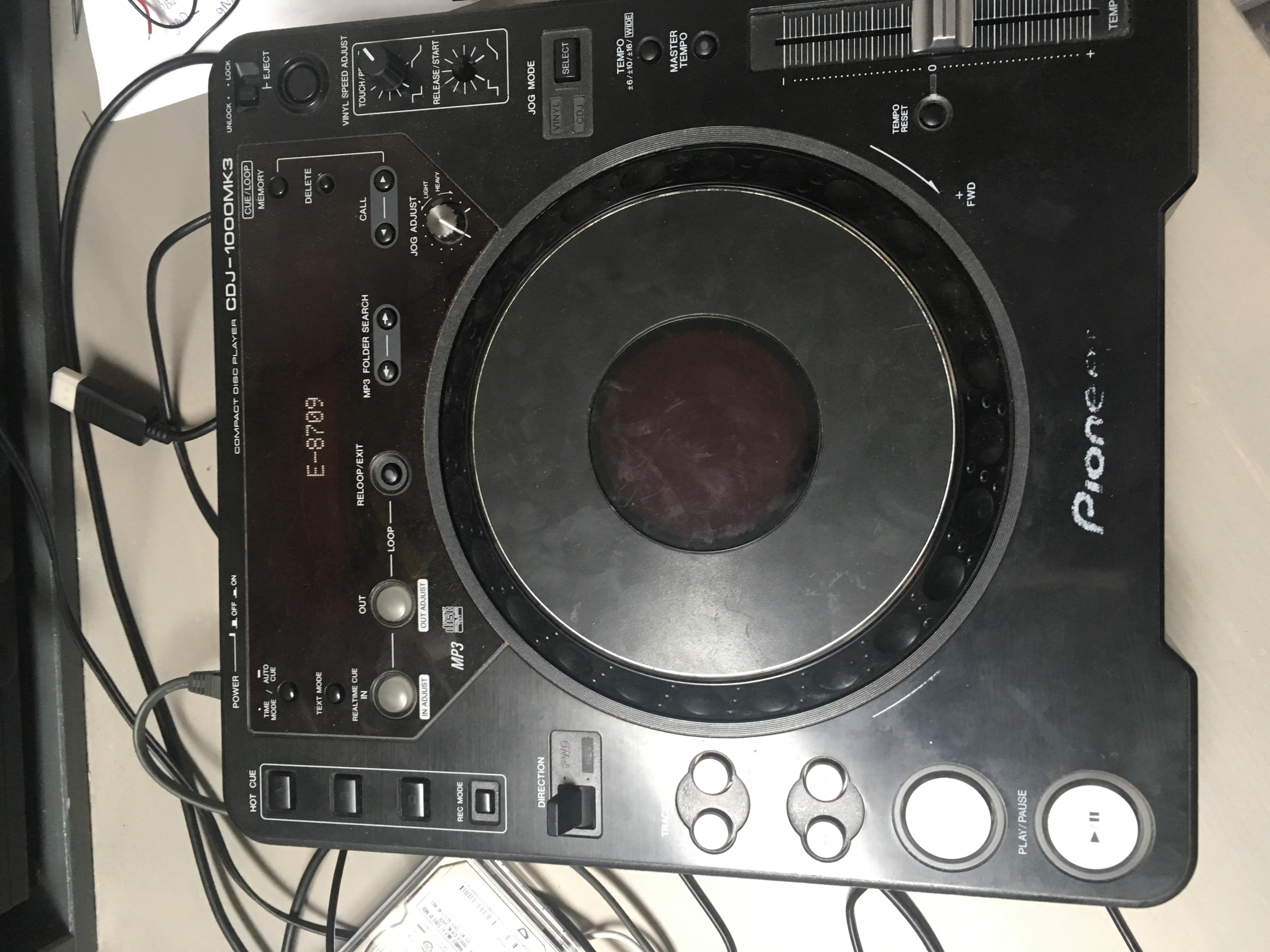
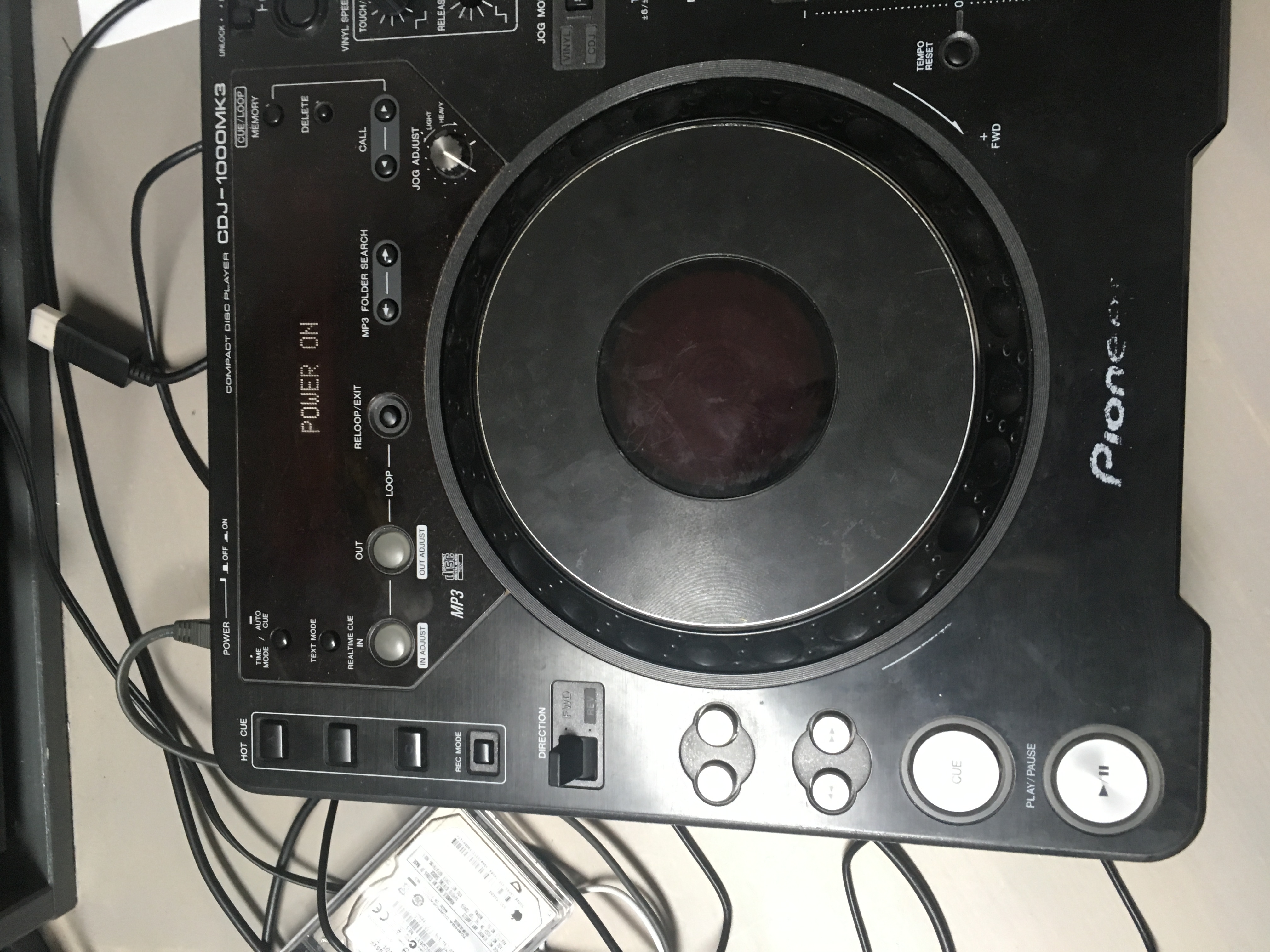
- When your CDJ’s are up and running. Launch recordbox.
- When Rekordbox is fully launched connect the micro usb of the STM32 to your computer
- Pioneer will give a notification in the left bottom corner the pioneer ddj-sx is connected.
- You can now use the CDJ to control recordbox.
Sidenote;
I assume you know how to configure your audio interface to connect separate channels to your external mixer. If you don’t have an audio interface and want to use your build in headphone or line out. Do the following;
- Start rekordbox
- Go to preferences
- Go to audio
- Select “built-in audio”
- Scroll down and select “external”
- Set output channel Deck 1, Left and Right to Output 1
- Set output channel Deck 2, Left and Right to Output 2
This is mono but you’ll be able to actually mix on your external mixer.
Friend please help me.
How do I connect the cables?
my knowledge is limited.
photos of the hardware connection would be very helpful.
I hope you can help me
Hi Fercho,
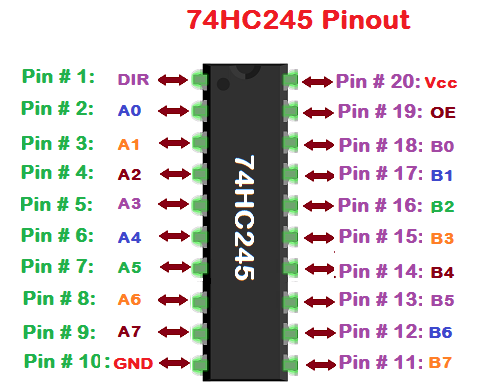
There were some photo’s missing by accident. I’ve added photo’s of the connection to the top panel. And a pin diagram of the 74HC245
I’ll try to describe the schematic.
(photo 3 & 4)
on the top panel (CDJ):
16 = XCS -> SLAVE SELECT
15 = SIN -> MISO
14 = SOUT -> MOSI
13 = SCLK -> CLOCK
so if you look at the schematic.
connect 16 of the top panel to pin 3 (A1) of the 74HC245
connect 15 of the top panel to pin 15 (B3) of the 74HC245
connect 14 of the top panel to pin 2 (A0) of the 74HC245
connect 13 of the top panel to pin 4 (A2) of the 74HC245
for DECK 1 (and 3)
connect pin 18 (B0) to pin PA7 on the first STM32
connect pin 17 (B1) to pin PA4 on the first STM32
connect pin 16 (B2) to pin PA5 on the first STM32
connect pin 5 (A3) to pin PA6 on the first STM32
for DECK 2(and 4)
connect pin 18 (B0) to pin PC3 on the second STM32
connect pin 17 (B1) to pin PB12 on the second STM32
connect pin 16 (B2) to pin PB10 on the second STM32
connect pin 5 (A3) to pin PC2 on the second STM32
good luck!
thank you.
Now I have the clearest idea.
If I have doubts? can I contact you again?
If I send you my cdj can you do this for me? Of course I will pay you
Hi Phil, If your are not able to do this yourself it’s probably better to just buy yourself a second hand set of cdj-850’s or even cdj-400’s. They support midi so you can use them with Rekordbox. If you want to go use your 1000’s you could choose the DVS solution pioneer offers.
Hi thank you for your kind words. My problem is that I tried to update the firmware update and caused ROM Errors on both of my CDJ so I have brick
If I pay you can you make me this board? I think I can install it and program the software
I am no sure the cost I like the form of the MK3
Can you publish the source code?
I really need because i want to do it on other microcontroller
Hi, You don’t need my source code. If you want to translate this to another microcontroller look at the following project -> https://github.com/DjFix/spi-spy
I mention this project already at the top of the page, It is how my project started.
Or go directly to the list of CDJ-1000 serial protocol pdf
Please add photos of the logical level changers.
the PCB built
I’ve added 2 photo’s to the post. I hope it helps.
Hello, I just read your great project. Great.
Can I use the audio outputs of cdj 1000 to have the sound on my external mixer ?
Thanks
No audio will play through Rekordbox. You will have to use an audio interface or you can use your built-in audio as mono. (As explained in the sidenote at the end of the article).
If you want a standalone option look at https://www.youtube.com/watch?v=QeebWVefyvs
On your project, I do not see any photo or image of the STM32 ?
How to connect it to the CDJ 1000 ?
Thank you
Indeed there is no photo of the STM32. Do you really need one? Photo 4 shows the PCB the STM32 connects to. But you could just breadboard it if you wanted to. Just use the schematic (photo 1) or the wire diagram (photo 2). (photo 5&6) shows where to connect on the CDJ-1000.
Thanks for those quick answers.
Too bad for the audio return.
Another question, does the screen STM23 display come on as on the project Pioneer CDJ-1000mk3 NEW LIFE ?
The display will come on and only show white. It will not display any information.
In the project “Pioneer CDJ-1000mk3 NEW LIFE” (standalone), the USB port and master tempo do not work.
On your project, both are working. How did you do it ?
I’m not exactly sure what you are referring to but on my project I just converted and mapped all the commands send from the CDJ-1000 to midi commands Rekordbox understands.
That’s also why in the download there is a midi mapping file for Rekordbox.
If you wanted to you could also use your CDJ’s for Tractor or Serato or any other software that can use a custom midi mapping.
I’m sorry but i’m french.
I wanted to compare with the project that started with Андрей Анацко
No need to excuse yourself. Have a look here for all the information on his finished project; https://github.com/djgreeb/CDJ-1000mk3_new_life_project
Here you will also find a link to the SOURCE CODE of his project! I will eventually also publish my source but I have a lot of cleaning todo before I publish….
Why did you use the 32F429IDISCOVERY.
Why not take the 32F746GDISCOVERY ?
I have a few of them lying around doing nothing….
Ok thanks for all these answers.
Have a nice day
Regards.
Hello, I will try to do this project.
But I still have some questions (sorry).
Can we customize the central JOG (red slip mode on the jog)
Can I send info (title and artist of the song) on the screen of the CDJ 1000 from rekordbox via MIDI ?
Thank you.
I thought of doing this, but I don’t know of any Rekordbox controllers that would allow to view song info while in MIDI mode. And I could not find information on how or if Rekordbox is sending this information. So I guess you’re stuck with looking at your laptop screen.
It should be possible to make the red CUE light on the JOG blink, but I choose the CDJ light because it wasn’t used. If I ever have nothing better to do I could take a look at it, but that won’t be anytime soon.
From your questions it sound like you really want to build the new life project. It has everything you requested. Also the source is already available, so you can tinker with it yourself. https://github.com/djgreeb/CDJ-1000mk3_new_life_project
Could we talk to each other privately ?
I wish I could create my project with an Arduino / Raspberry Pi and add new features.
Why use a SPI LEVEL SHIFTER with an STM32 ?
The STM32 motherboard does not know how to handle the SPI ?
How did you make Rekordbox recognize a DDJ-SZ ? Could you use another device like the XDJ 1000 to display the text on the screen of the CDJ 1000 ?
Thanks for your help.
Regards.
Dominique
I’d rather keep the discussion in the comment session. That way everybody can learn from the questions asked.
Of course you could create your own project with Arduino / Raspberry Pi. I did try using an old Arduino and this works but won’t emulate a pioneer controller. https://youtu.be/3B1zZD2IAlU
You should use a new one like the ATmega32U4 and lookup https://www.musiconerd.com/single-post/arduino-pro-micro-as-a-usb-midi-device
You would need to emulate a genuine Pioneer device to have control over the JOG wheel. https://djtechtools.com/2017/05/08/hack-rekordbox-use-controllers-jogwheels/
A SPI level shifter is used to convert the voltage of the logic level a device is working on. The CDJ 1000 works with 5volts the STM32 works wit 3.3volt.
Whatever device you choose, STM32, Arduino, rPI, All of them have the option to change how it is seen by your computer. So yes you could change it to detect it as a XDJ-1000 but I think this probably won’t give you access to the song info from record box because this is not send over MIDI but over HID.
If you want start your own project and display info on the screen of the CDJ 1000 look at the information found here https://github.com/DjFix/spi-spy
Meanwhile I’m going through my source code and do a lot of commenting so I can publish this for makers like yourself to play with. I don’t have use for it anymore because I got myself a pair of Nexus CDJ’s 🙂 Still this could take a couple of more weeks though.
Great, a big thank you for all this information and links.
It’s cool to have the 900 Nexus. It’s sure it’s more convenient compared to the CDJ 1000.
Otherwise, with all this information, it really makes me want to start with an ATmega32U4 arduino.
But should I use an SPI level shift to convert the voltage of the logic level value with the ATmega32U4 ?
On your STM32 motherboard, what is the programming language ?
What software would I need ?
I admit that I am not very comfortable with C ++ but with Python it’s more easy.
You’re right on the XDJ 1000. Rekordbox does not send info via MIDI, but via HID.
I checked your Spi-Spy documentation in PDF. It is complete and it will help me for other functions. Thank you.
About your source code, will it be easy to postpone it on Arduino ?
Thank you for your help.
Regards.
It’s even cooler to have 2000 Nexus 😉
I Think it’s a good idea to start with ATmega32U4 like Arduino Micro. You’ll have to work with C++ but you get used to it quite quickly if you already know other languages. Just work through the examples you can find. And create small projects that you connect together.
The Arduino is there in a lot of different flavours. 16mhz 5v / 8mhz 3.3v. If you choose the 5volt version you might not need the the logic level shifter but should still use pull-up resistors. https://dorkbotpdx.org/blog/paul/better_spi_bus_design_in_3_steps/
I guess you could use the general idea of the source but you will have to write new code to make it work anyway. A good start would be to first start with making a simple MIDI controller with the Arduino (just the CUE & PLAY button) and make that work with Rekordbox before you start with the CDJ SPI part.
Just look at the list of MIDI messages at the end of page 5.
https://www.pioneerdj.com/-/media/pioneerdj/software-info/controller/ddj-sx/ddj-sx_list_of_midi_messages_e.pdf
Play Deck 1 -> 9B 0C OFF=0x00, ON=0x7F
CUE Deck 1 -> 9B 10 OFF=0x00, ON=0x7F
Don’t expect the Arduino to handle all the data send back from Rekordbox. The STM32 is not even fast enough. This is because of the fact that USB-MIDI works on USB1.1
Hi.
A big thank you for all this info.
do you have a source code extract in C ++ for the arduino?
As soon as I buy an arduino Leonard, I’ll attack the first tests.
Arduino works in Usb 2.0
Thanks.
Regards
Hi J van Doeselaar.
I hope you are well ?
I got an Arduino Leonardo with MIDI-USB library and management of SPI SPY in 5V.
I have a problem and I can’t see the results on my console (like you on the video).
I did not display anything when I pressed CUE or PLAY on my CDJ deck. I loaded the SPI and MIDI-USB libraries on my project.
On my CDJ 1000, I soldered the XCLK, SIN, SOUT and GND wires to the CN1502 connector and I took care to disconnect the connector from the MAIN ASSY card (CN501).
Can you help me by providing the source code for your Arduino test ([email protected]) ?
Thank you in advance for my project.
I am writing to you for information on the SPI-SPY of the CDJ-1000.
Can you help me ?
I have an ARDUINO module and I would like to use it to communicate with my CDJ deck via the SPI bus.
On my CDJ, I solder the SCLK, SIN, SOUT, SS and GND wires on my Arduino board (SPI in 5V).
I downloaded the Arduino IDE, loaded the SPI library.
I can’t see the results in my console.
Nothing is displayed as soon as I press a key of the CDJ.
Would you kind enough to send me an extract from the Arduino source code to help me start this project ?
Thank you for your help.
Regards.
Dominic
where does the audio come out?
Your computer or audio interface it depends on your rekordbox configuration
Which version of RekordboxDJ do you use?
Windows or Mac?
Can I use this with serato?
I ask this because in serato you cannot select the audio output.
Or can the audio output be selected somehow in serato?
Hi J van Doeselaar,
I come back to you because I currently have an STM32F7-Discovery card and I would like to program it to have USB-MIDI and change the VID and PID of the USB.
Can you help me integrate these functions?
I would like to redo this code for my STM32F7 card.
Thank you for your help.
Regards.
Dominique
I am using STM32CubeMX and Keil uVision5 programs
Hi J van Doeselaar, how are you? I hope everything is alright! I apologize for my English, as I am using google translator.
First I want to congratulate you for the project (cdj 1000 mk3 for rekordbox), it was very good!
So, I got to look at the Андрей Анацко project and realized that (I may be mistaken), that the SPI LEVEL SHIFTER card the configuration and layout are the same in both projects?
And could you send me more pictures of this mounted plate, if possible? because I’m an amateur in electronics. If you can send this is my email [email protected].
From now on!
First of all congratulations on the initiative and project ….
I already have the CDJ working here using the DJ Green method, using the STM32F7 … I have some questions:
1 – Would it be possible to add your USB MIDI source code with the DJ Greeb source code?
2 – Is it possible to use another model of STM32F4? Or the one you are using is already underperforming?
3 – If I put your code on my STM32F7 card will it work?
Thank you very much
I am not sure which other project you are referring to. The F7 is not the F4 but you could probably use parts of the source code for your project.